Sheet 007 — 2026
The hard work behind a proper authentication system
An email, a password, and a button. Then someone forgets the password, opens another tab, loses their connection, and would still quite like to use the application.
01 / 09
Two fields. Quite a lot behind them.
You follow a link to a project in Eskiz. You need to sign in. Ideally, you enter your details and arrive at the project you meant to open. Nobody came here to appreciate our authentication architecture.
Now forget the password, get the code late, or sign in on another laptop. The form has to explain what happened and offer a next step that works.
We use WorkOS for identity, a shared backend for sessions, and our own frontend for the experience. The character is the part we can show someone without first opening a threat model.

02 / 09
What WorkOS does. What we still do.
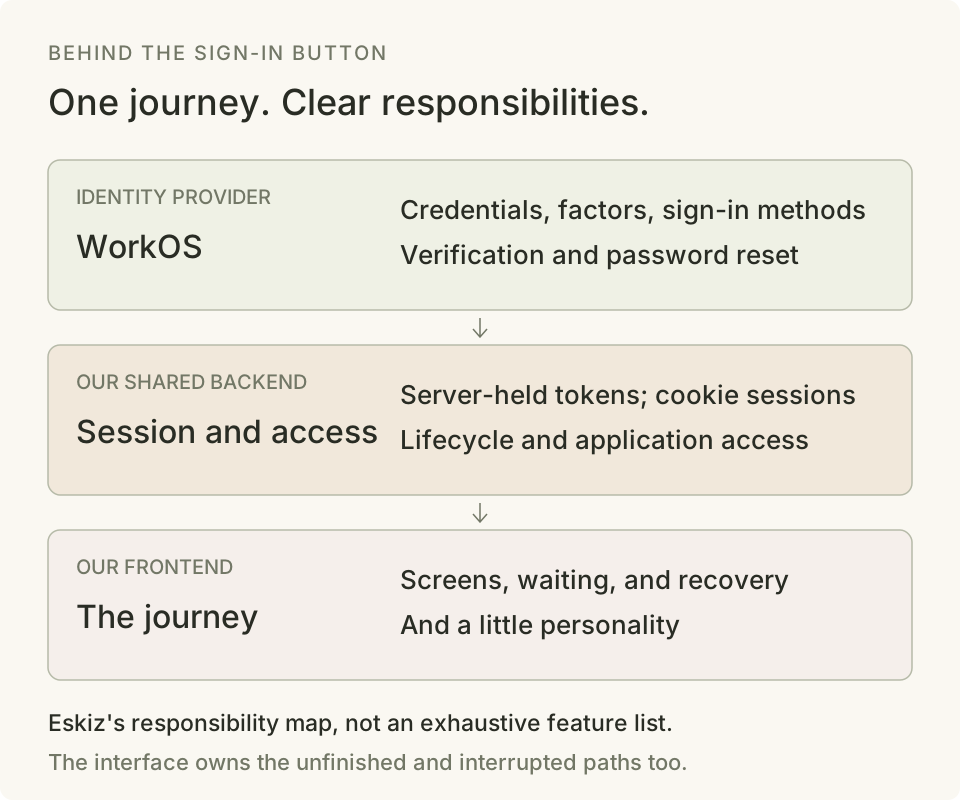
WorkOS handles the identity-provider side: checking credentials, supporting the configured social and enterprise sign-in methods, and supplying verification, password-reset, and multi-factor mechanisms. In our configuration, it also delivers verification codes and reset emails. We do not maintain our own password database.
Hosted AuthKit handles much of the journey and lets you brand it. We wanted to control the layout, wording, order, and motion. Changing a logo and owning that experience are different jobs.
The prebuilt path was frustrating for what we wanted. WorkOS does support custom interfaces through its API. We took that route and inherited the work the hosted screens would have done.
WorkOS documents both the hosted UI and its branding controls.
Its custom-UI examples show the alternative: keep the identity service and build the frontend yourself.
With our custom password flow, credentials pass through our API to WorkOS; using an identity provider does not remove that handling responsibility. Our backend turns the identity result into a browser session: it verifies the returned evidence, keeps provider tokens on the server behind an HttpOnly cookie session, and applies our application's access rules. Our frontend turns the answers into something a person can follow. Three responsibilities. They happen to meet under one Sign in button.
03 / 09
“One more step” is several different steps.
Back to our project link. The password passes, but the email needs verification. The server returns a pending step and the frontend asks for a code. Victory can wait.
The next step might instead be an authenticator code, enrolling that authenticator, an additional email check requested by risk detection, or choosing an organization. Each needs different instructions, different data, and a different way back. A single isLoading flag is being asked to manage a small civil service.
Email → Password → Submitting
                         ├─ Signed in
                         ├─ Verify email
                         ├─ Authenticator step
                         ├─ Choose organization
                         └─ A reason to stop or retry

A pending step is a branch, not a successful login.
The smaller states matter too. Email focus is a chance to show where to type. Caps Lock can explain a password mistake before a request ever leaves. On registration, a password-policy refusal tells you what to change; on sign-in, a rejected credential stays deliberately vague. A code can be incomplete, ready, sending, or expired. Those details decide what is focused, what can be pressed, and what the next sentence should say.
Our shared auth package separates the rules from the effects. One part decides what a timeout or submitted code means; another makes requests and runs timers. React renders the answer. We can test the journey without asking a browser to improvise it.
The backend owns the unfinished authentication too. It keeps the provider's pending token in sealed server-side storage and gives the browser the step and the display information it needs. The browser does not become the filing cabinet for half a login.
04 / 09
A refusal needs a useful next sentence.
A rejected password, an expired code, a rate limit, and an unavailable provider should not all produce the same red paragraph. The next useful action is different. Retype something. Start the code flow again. Wait for a countdown. Retry when the service can answer.
Password recovery gives the same public acknowledgment whether or not an address has an account. An error message should help the person, not become a directory.
Waiting does not mean the password is wrong. A temporary failure should not erase what you typed.
A rejected code consumes the pending attempt and needs a fresh sign-in. An explicit provider outage can preserve an unexpired attempt for retry. The same Try again button would make two different promises.
A late response belongs to the request that made it. If you changed the flow, it should not pull you back into an old screen.
Code incomplete → Ready → Sending
                           ├─ Accepted → Continue
                           ├─ Refused → Sign in again
                           └─ Outage → Retry if still valid
05 / 09
Signed in. Now can I open my project?
Authentication tells us who arrived. It does not settle which workspace they can enter, whether a membership is still active, or whether a particular operation is allowed. WorkOS has organization and permission features; our application still has to connect identity to its own resources and enforce its own decisions on the server.
Even a first successful sign-in can arrive before the person's workspace is ready. Our session view distinguishes preparation, readiness, and failure. The frontend can explain that the bench is being set up, wait within a bounded policy, or offer recovery. Sending someone back to a password form because workspace setup failed would be a peculiar diagnosis.
A presence hint can prevent a flash of the sign-in screen on a returning visit. It grants no access. A familiar-looking screen is a courtesy, not a credential.
An unreachable service is also different from an expired session. The frontend keeps those outcomes distinct. A network problem must not be presented as proof that the person has suddenly become somebody else.
06 / 09
Success has somewhere to go.
You signed in because a project link brought you here. If that return destination is allowed, we carry it through the journey. Opening the dashboard instead would technically be a successful login. It would also be the wrong answer to what you were trying to do.
Without a destination, a returning password sign-in goes to the dashboard. A new password account goes straight to setup: tell us what you make, or skip it, then continue when your workspace is ready. A social button can serve both new and returning people, so first-run routing checks whether setup has already been answered.
The transition has a job. Eskiz holds the sign-in picture while the destination changes underneath; the new screen then takes over. That avoids briefly flashing an already-signed-in screen in the middle. The plain setup screen leaves directly, without replaying the entrance. Success should feel like arriving, not like being shown another receipt.
Compare the destinations
- Sign inKeep the allowed return destination.
- Check accessThe session still needs permission to open the project.
- Open the projectReturn to the work that brought you here.
07 / 09
Even signing out has a sequel.
Suppose you sign out, the request is delayed, and then you sign in again. The old request eventually completes. It must end the old session, not the new one. This is an unusually destructive place to use the phrase whatever is current.
The frontend remembers which session you meant to end, even across a reload. The browser can show you signed out before the server confirms it; recovery has to respect that gap.
The backend ends the local session and records the provider revocation together. If the provider is unavailable, the revocation remains queued.
Our normal sign-in policy also replaces the person's previous browser sessions. The new session and the retirement of the old ones are coordinated together. The older tab can then explain that another session replaced it. That is our product choice, rather than a rule every application should copy.
Account changes extend the same reasoning: changing an address, removing an authenticator, or scheduling deletion needs its own proof and recovery behavior. Signing in once does not turn every later button into a harmless button.
08 / 09
And then we made somebody look away.
All of this can feel rather severe. In Eskiz, a maker works beside the sign-in form. Focus the password and the character looks away. A refused password gets a small reaction. It is a modest way to make a utilitarian moment feel like part of the application.
It also introduces another state system. The scene follows sanitized signals such as focus, submitting, and a password refusal. It does not read or retain the password. Looking away is a gesture of privacy, not a security mechanism. The actual security still has to work while our colleague is busy being charming.

Transitions matter here too. If the person switches fields halfway through a movement, the character should continue from where it is instead of jumping to a different pose. Recovery and cooldown should not inherit an unrelated password-error reaction. The scene observes the form's real state; it does not invent its own version of whether an email was sent.
The form must remain complete without the performance. Reduced motion and rendering fallbacks have a still-image path. On narrow screens, the current layout leaves the character out and gives the form the space. The picture should never be the only place that explains a problem.
We keep the jokes around the experience, and the instructions plain. Someone trying to recover an account has already supplied enough entertainment for the evening.
Try the character states

09 / 09
Test the paths you hope nobody takes.
Test the late reply, the interrupted verification, and the logout that finishes after another sign-in. Check what the person sees, what the server allows, and whether the retry targets the right session.
Our in-memory backend makes these states reproducible. We can test a slow response without waiting for WorkOS to have an educational afternoon. Separate backend tests cover persistence, provider failures, and the session lifecycle.
This does not establish that authentication is finished or that a test count is a security audit. It gives each rule an owner and a way to fail visibly when that rule changes. Deployment settings, provider configuration, and real integration checks remain part of the job.
That is what I mean by proper authentication: a reliable way in, a reliable way out, and an understandable next step when something goes wrong. WorkOS takes an important part of that work. Our frontend and backend still have to make the whole journey hold together.
If we do it well, you get back to your project. The maker goes back to work. Nobody has to admire the login system. I would consider that a very good review.